> ## Documentation Index
> Fetch the complete documentation index at: https://www.outx.ai/docs/llms.txt
> Use this file to discover all available pages before exploring further.
# LinkedIn Sales Navigator Export
> Export leads from LinkedIn Sales Navigator to Excel with OutX.ai. Step-by-step guide to safely scrape and download Sales Navigator lists.
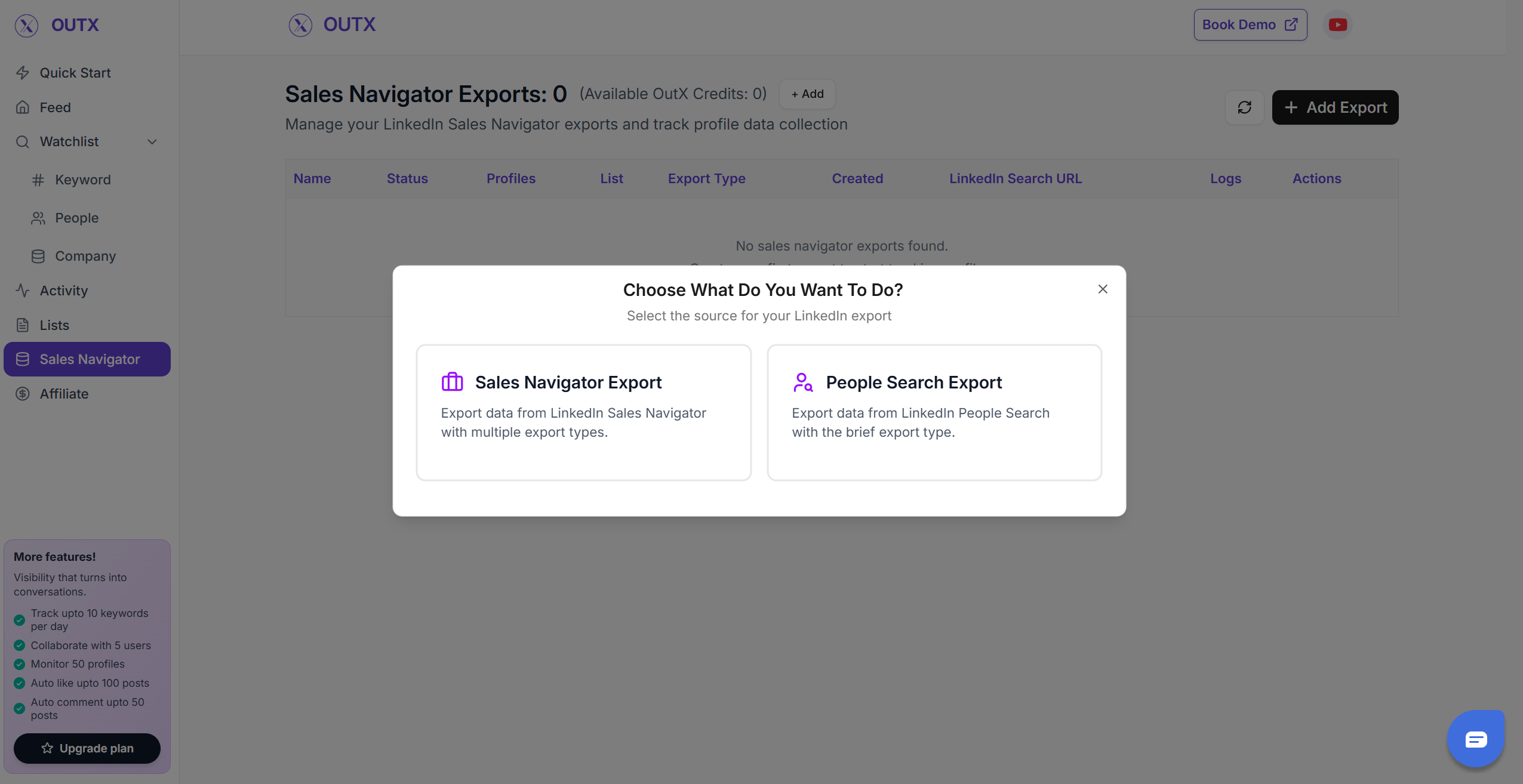
## 1. Select the "Type of export"
Select what you want to export from LinkedIn
### Sales navigator export
* Using this you can scrape the profiles from LinkedIn sales navigator scraper
* You can Copy the sales navigator URL or press export on the page.
 ## **2. Create your Sales Navigator lead list**
Once the Chrome extension is installed, go to the list of leads you want to export. It can be:
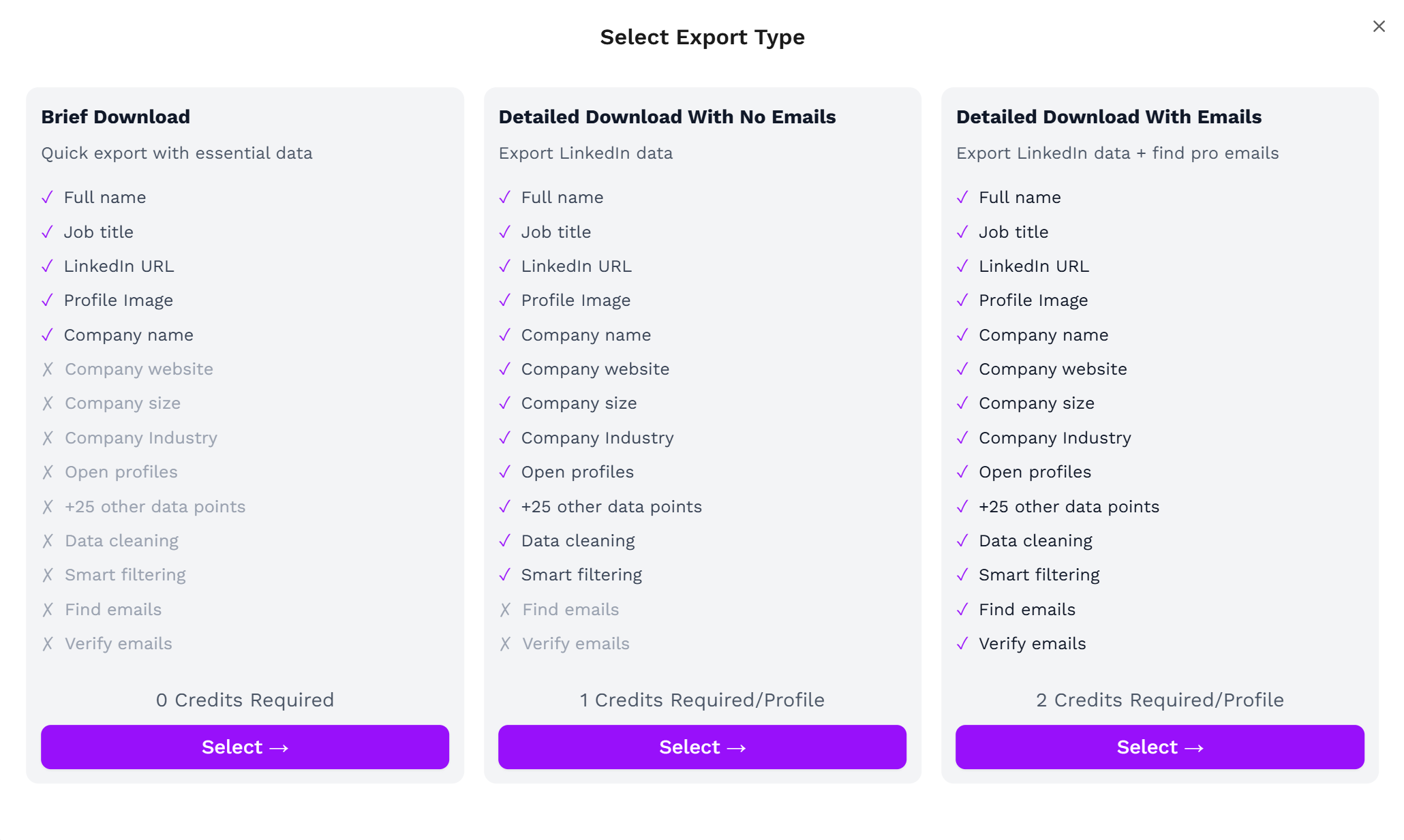
1. Brief Download
2. Detailed Download With No Emails
3. Detailed Download With Emails
[OutX](https://outx.ai) handles all the use cases.
## **2. Create your Sales Navigator lead list**
Once the Chrome extension is installed, go to the list of leads you want to export. It can be:
1. Brief Download
2. Detailed Download With No Emails
3. Detailed Download With Emails
[OutX](https://outx.ai) handles all the use cases.
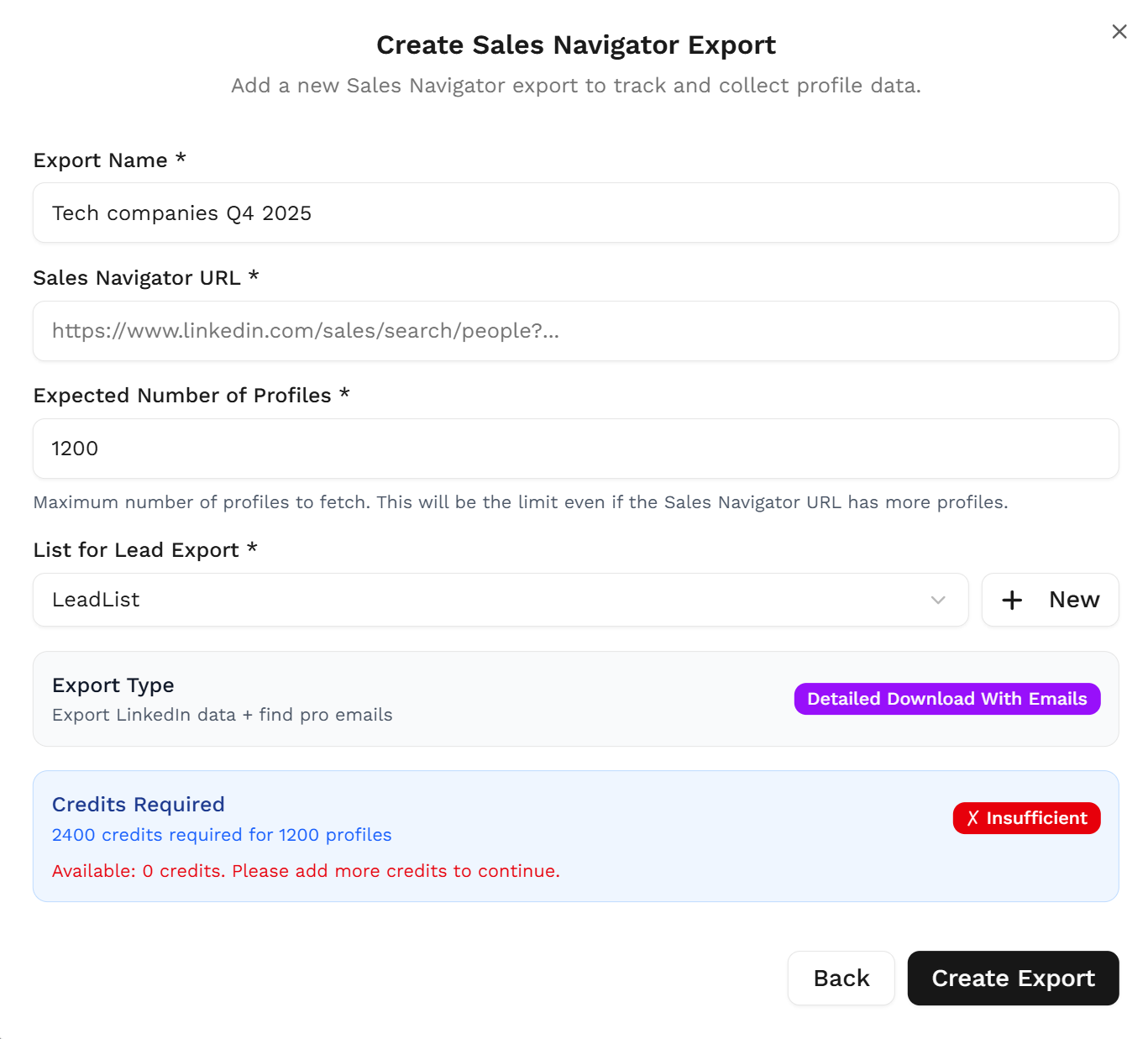
 Fill out all the information in the form
 Outx.ai will export all these leads in real-time.
That makes your lead generation process **GDPR-compliant**, in opposition to using databases.
## **3. Download your cleaned list**
After the extraction is done, you will get an email. This email will have a link to download your lead list in a CSV file.
Outx.ai will export all these leads in real-time.
That makes your lead generation process **GDPR-compliant**, in opposition to using databases.
## **3. Download your cleaned list**
After the extraction is done, you will get an email. This email will have a link to download your lead list in a CSV file.
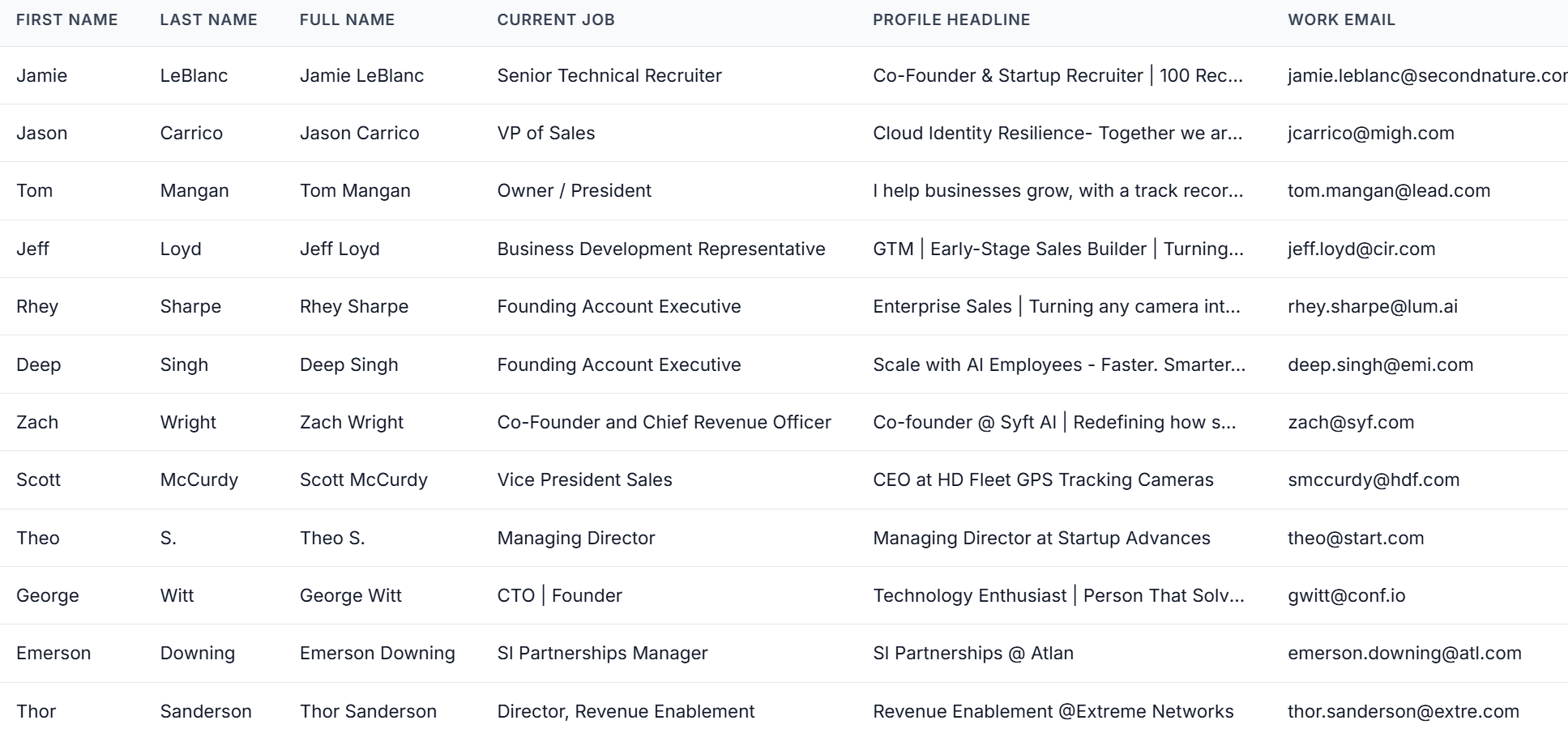 Outx.ai does much more than export your list. It also **cleans all the names and company names** of your LinkedIn contacts.
The data on **LinkedIn is not clean.**
Cleaning data from your sales navigator export can take hours if you do it manually.
The **Outx.ai cleaning algorithm** takes care of all this work for you by automatically cleaning:
1. First names
2. Last names
3. Company names
4. Job titles
Nobody wants to spend hours cleaning Excel files. Better let robots do this boring job.
## Frequently Asked Questions
Yes. OutX extracts data directly from your Sales Navigator searches and lists, so you must have an active subscription.
No. Sales Navigator does not offer built-in export. OutX enables safe exporting through its Chrome Extension.
OutX can export **up to 2,500 results per Sales Navigator search**. For standard LinkedIn People Search, exports support up to 2,500 results per search as well.
Yes. All data comes directly from your own LinkedIn session, keeping the workflow **GDPR-compliant** and secure.
Yes. The Chrome Extension powers the on-page *Export* button and allows OutX to fetch data in real time.
Exports are delivered as **CSV files**, ready for CRMs, enrichment tools, or cold email sequences.
Yes. OutX automatically cleans first names, last names, job titles, and company names to deliver a polished dataset.
Yes. Choose **Detailed Download With Emails** if you want email fields included (availability depends on LinkedIn visibility).
On an average it takes 5-10 minutes to export a LinkedIn sales navigator list.
If your Sales Navigator export is stuck at 0%, try the following:
1. **Check your Sales Navigator subscription** - You need an active LinkedIn Sales Navigator subscription for this feature to work
2. **Check the Chrome extension** - Make sure the OutX extension is installed, enabled, and your browser is open
3. **Check LinkedIn login** - Ensure you are logged into LinkedIn in the same browser where the extension is running
4. **Try refreshing** - Close and reopen the export page, then try again
5. **Try a smaller search** - If your search has thousands of results, try narrowing it down and exporting a smaller batch first
6. **Contact support** - If none of the above works, email **[support@outx.ai](mailto:support@outx.ai)** with your export URL and we'll investigate
Currently, OutX supports exporting **leads** (people) from Sales Navigator. Company/account-level export from Sales Navigator is not yet available but is on our roadmap.
***
## Learn More
* [LinkedIn Sales Navigator Guide](https://www.outx.ai/blog/linkedin-sales-navigator)
* [Sales Navigator Filters Guide](https://www.outx.ai/blog/linkedin-sales-navigator-filter)
* [Build a Targeted Lead List with Sales Navigator](https://www.outx.ai/blog/build-targeted-lead-list-linkedin-sales-navigator)
* [Get Emails from Sales Navigator](https://www.outx.ai/blog/get-emails-linkedin-sales-navigator)
Outx.ai does much more than export your list. It also **cleans all the names and company names** of your LinkedIn contacts.
The data on **LinkedIn is not clean.**
Cleaning data from your sales navigator export can take hours if you do it manually.
The **Outx.ai cleaning algorithm** takes care of all this work for you by automatically cleaning:
1. First names
2. Last names
3. Company names
4. Job titles
Nobody wants to spend hours cleaning Excel files. Better let robots do this boring job.
## Frequently Asked Questions
Yes. OutX extracts data directly from your Sales Navigator searches and lists, so you must have an active subscription.
No. Sales Navigator does not offer built-in export. OutX enables safe exporting through its Chrome Extension.
OutX can export **up to 2,500 results per Sales Navigator search**. For standard LinkedIn People Search, exports support up to 2,500 results per search as well.
Yes. All data comes directly from your own LinkedIn session, keeping the workflow **GDPR-compliant** and secure.
Yes. The Chrome Extension powers the on-page *Export* button and allows OutX to fetch data in real time.
Exports are delivered as **CSV files**, ready for CRMs, enrichment tools, or cold email sequences.
Yes. OutX automatically cleans first names, last names, job titles, and company names to deliver a polished dataset.
Yes. Choose **Detailed Download With Emails** if you want email fields included (availability depends on LinkedIn visibility).
On an average it takes 5-10 minutes to export a LinkedIn sales navigator list.
If your Sales Navigator export is stuck at 0%, try the following:
1. **Check your Sales Navigator subscription** - You need an active LinkedIn Sales Navigator subscription for this feature to work
2. **Check the Chrome extension** - Make sure the OutX extension is installed, enabled, and your browser is open
3. **Check LinkedIn login** - Ensure you are logged into LinkedIn in the same browser where the extension is running
4. **Try refreshing** - Close and reopen the export page, then try again
5. **Try a smaller search** - If your search has thousands of results, try narrowing it down and exporting a smaller batch first
6. **Contact support** - If none of the above works, email **[support@outx.ai](mailto:support@outx.ai)** with your export URL and we'll investigate
Currently, OutX supports exporting **leads** (people) from Sales Navigator. Company/account-level export from Sales Navigator is not yet available but is on our roadmap.
***
## Learn More
* [LinkedIn Sales Navigator Guide](https://www.outx.ai/blog/linkedin-sales-navigator)
* [Sales Navigator Filters Guide](https://www.outx.ai/blog/linkedin-sales-navigator-filter)
* [Build a Targeted Lead List with Sales Navigator](https://www.outx.ai/blog/build-targeted-lead-list-linkedin-sales-navigator)
* [Get Emails from Sales Navigator](https://www.outx.ai/blog/get-emails-linkedin-sales-navigator)