> ## Documentation Index
> Fetch the complete documentation index at: https://www.outx.ai/docs/llms.txt
> Use this file to discover all available pages before exploring further.
# People Watchlist
> Easily track LinkedIn profiles with OutXAI's People Tracking tool. Monitor CEOs, competitors, and influencers with automated updates, watchlists, labels, and real-time alerts all in one place.
**OutXAI's LinkedIn profile tracking** monitors selected profiles automatically and delivers organized updates.
### How It Works
* Add LinkedIn profiles to monitor
* OutXAI scans profiles every 12 hours
* Get clean feeds of posts, updates, and activity
* Organize with watchlists, labels, and notifications
> Too Long? Check out this Video →
***
## Quick Setup Guide
### **1. Create Watchlist**
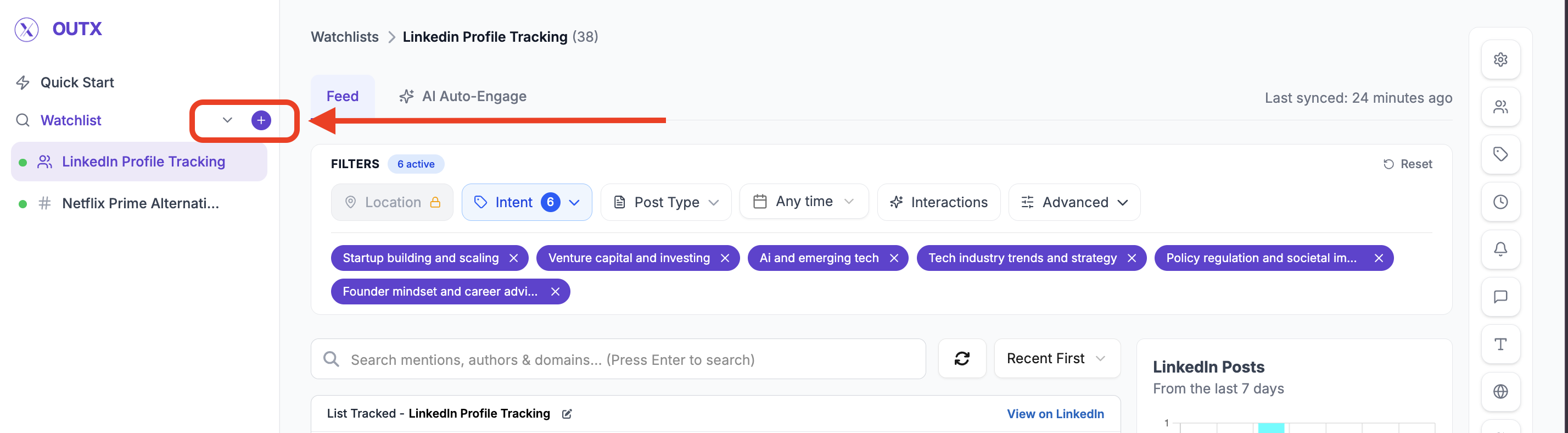
Click "**+"** along with watchlist to create a new watchlist and click on people
A people watchlist lets you **track specific LinkedIn profiles** and get notified when something changes like new posts, job updates, or activity.
***
### **2. Add Profiles**
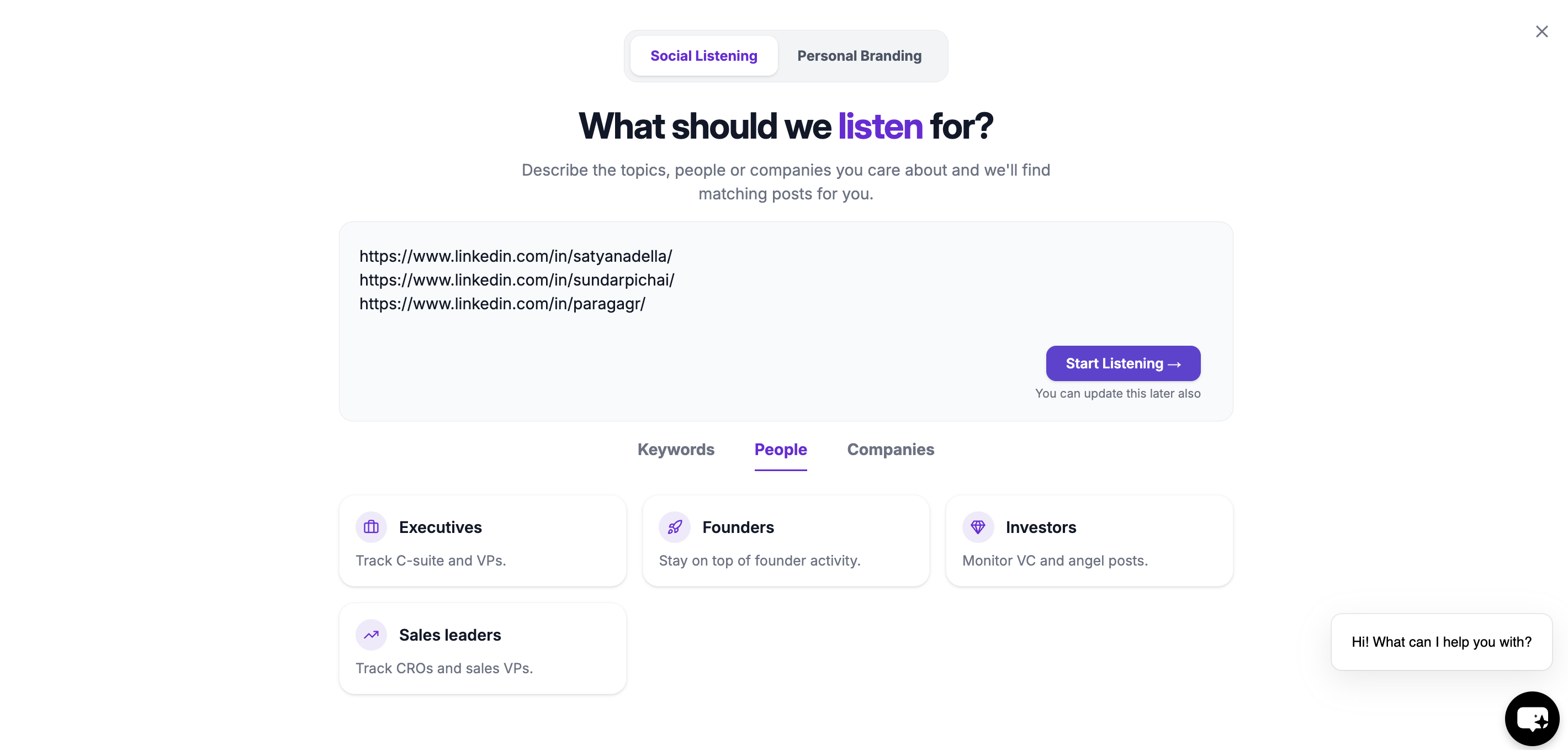
This step defines **which LinkedIn profiles OutX.ai should monitor**.
Examples:
* *Key Prospects*
* *Target Founders*
* *Hiring Managers – US*
This helps when you manage multiple people watchlists.
This will create your people watchlist
***
### **3. Set Intents**
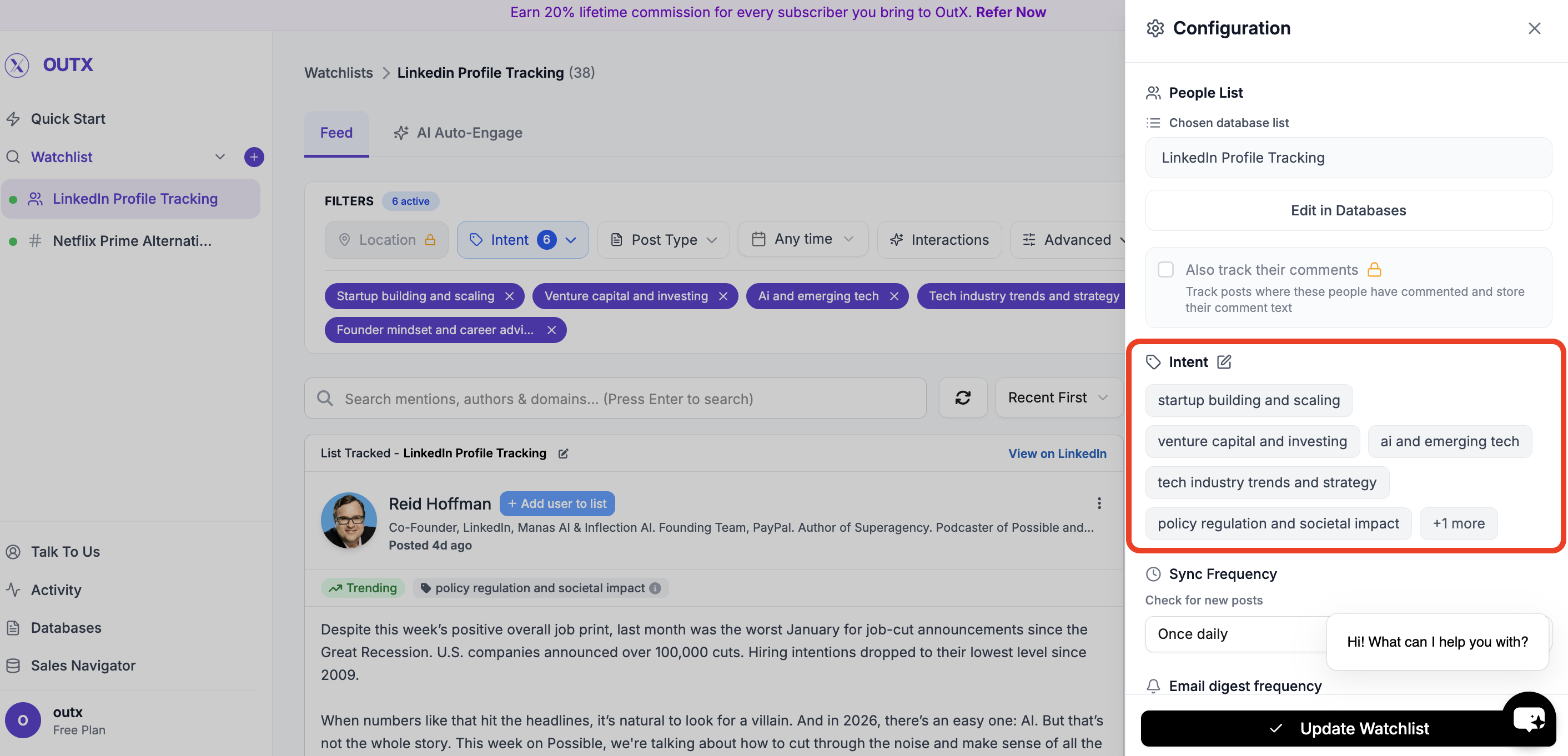
Intents help you **group people's post inside a watchlist**.
Instead of tracking everyone the same way, labels let you:
* Segment posts by role, intent, or priority
* Filter updates more easily
* Understand *why* someone is being tracked
**Intent Name**
A short category name such as:
* *Startup Mentors*
* *High-Intent Leads*
* *Decision Makers*
**Intent Description**
Add a short note explaining who belongs in this label.
This makes it easier for you and your team to stay aligned.
***
### **4. Advanced Watchlist Settings & Notifications**
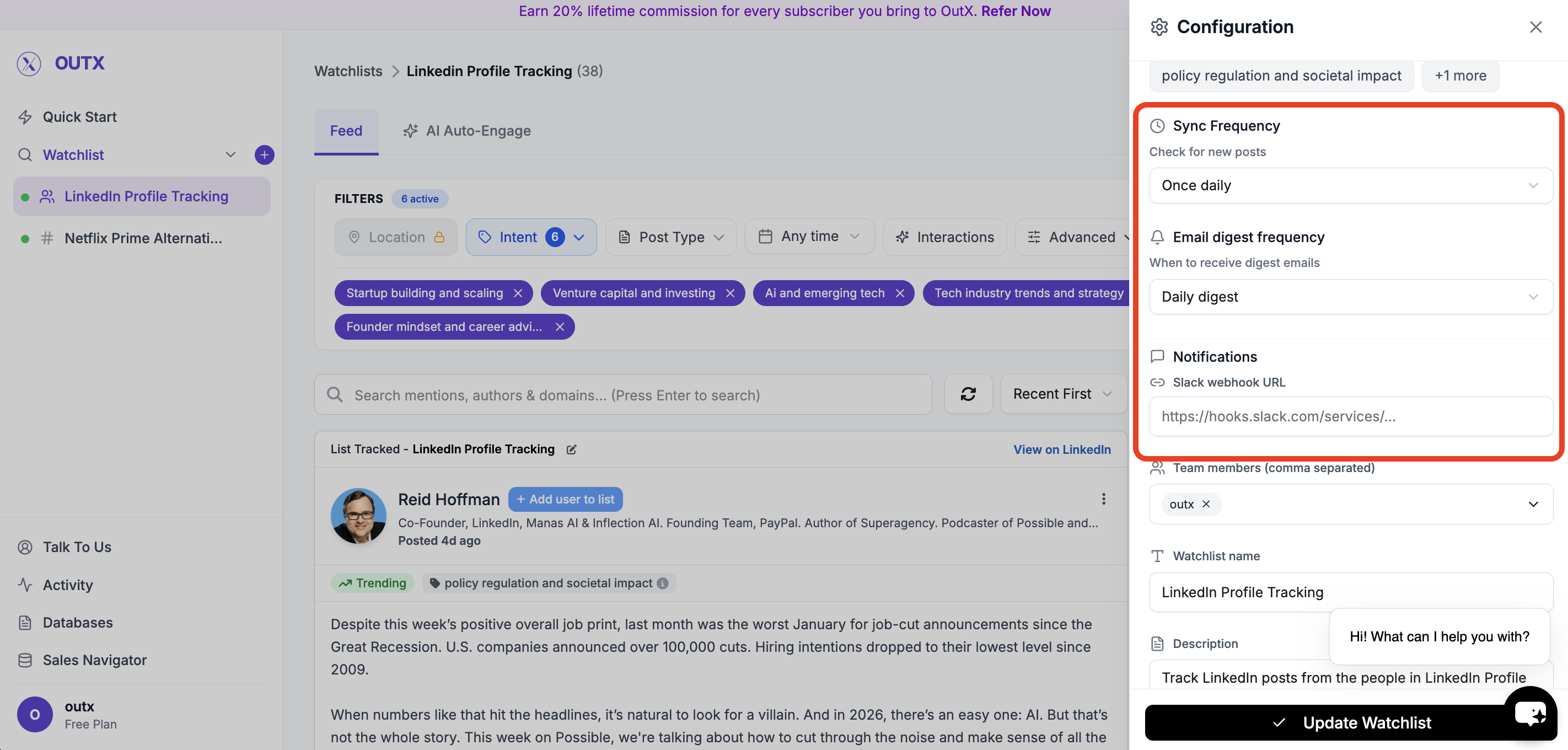
Fine-tune how and when you're notified:
* **Fetch frequency**: How often OutX.ai scans LinkedIn (e.g., every 12 hours)
* **Team access**: Add teammates to the watchlist
* **Slack integration**: Drop in your webhook URL to receive real-time alerts
### Feed
OutX.ai now tracks all selected LinkedIn profiles automatically, delivering relevant updates without manual checking.
You can use filters to figure on left side to narrow down on your posts, to learn more about filters click here.
***
## How to edit people watchlist?
### 1. Open Watchlist
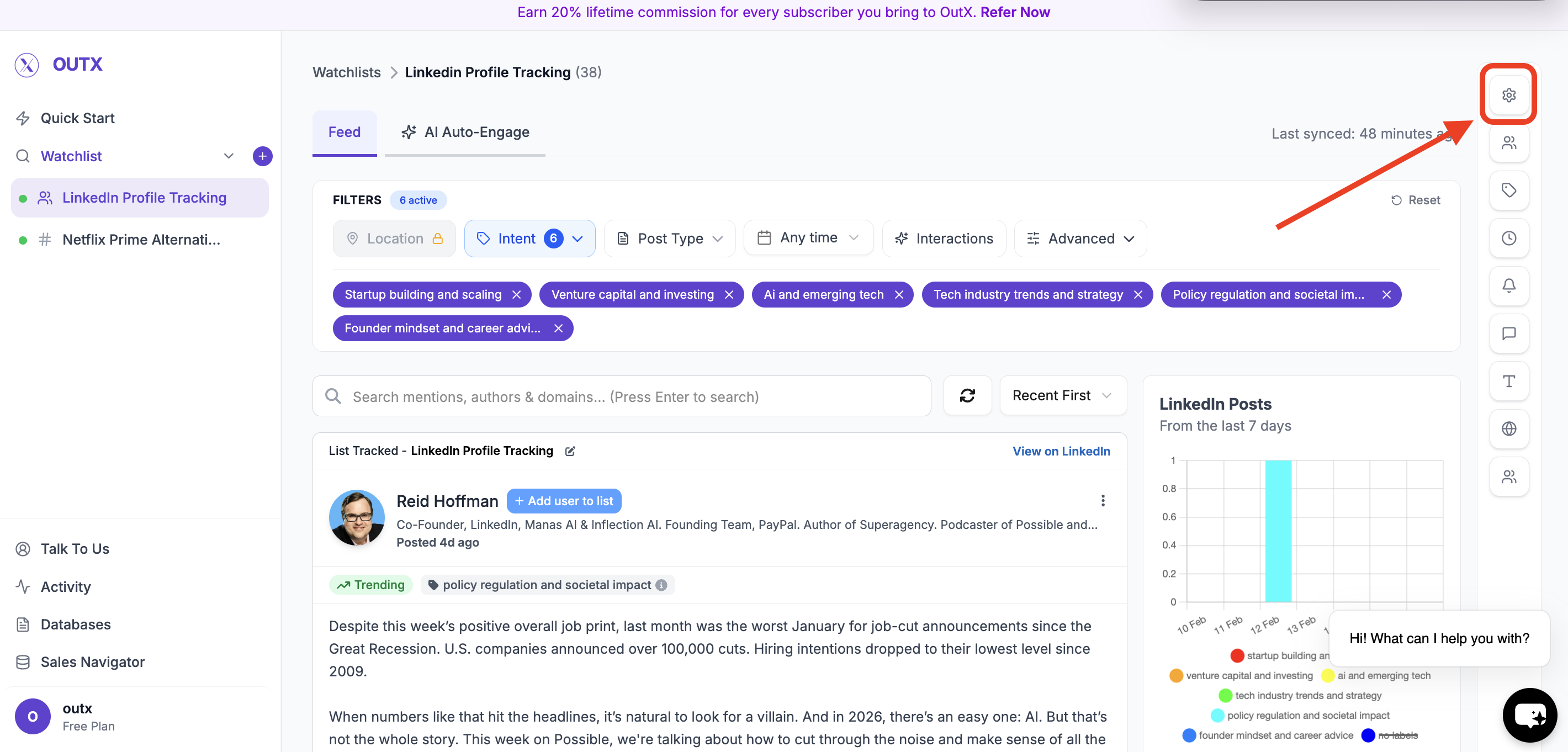
Navigate to **Watchlist you want to update** from the main dashboard. Click the **configuration(Gear icon)** on right side panel.
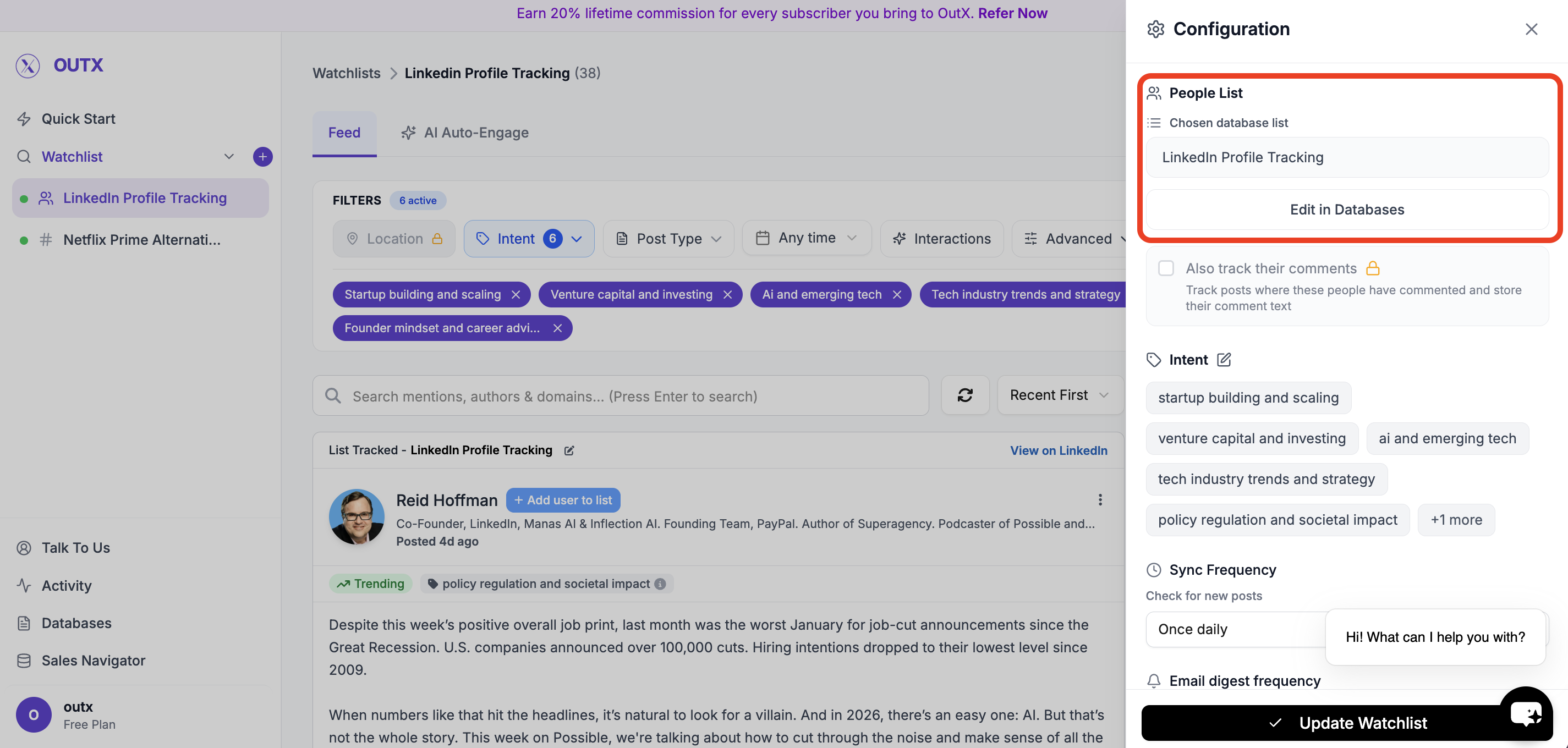
### 2. Edit in database
Click on edit in database then add people in selected list.
***
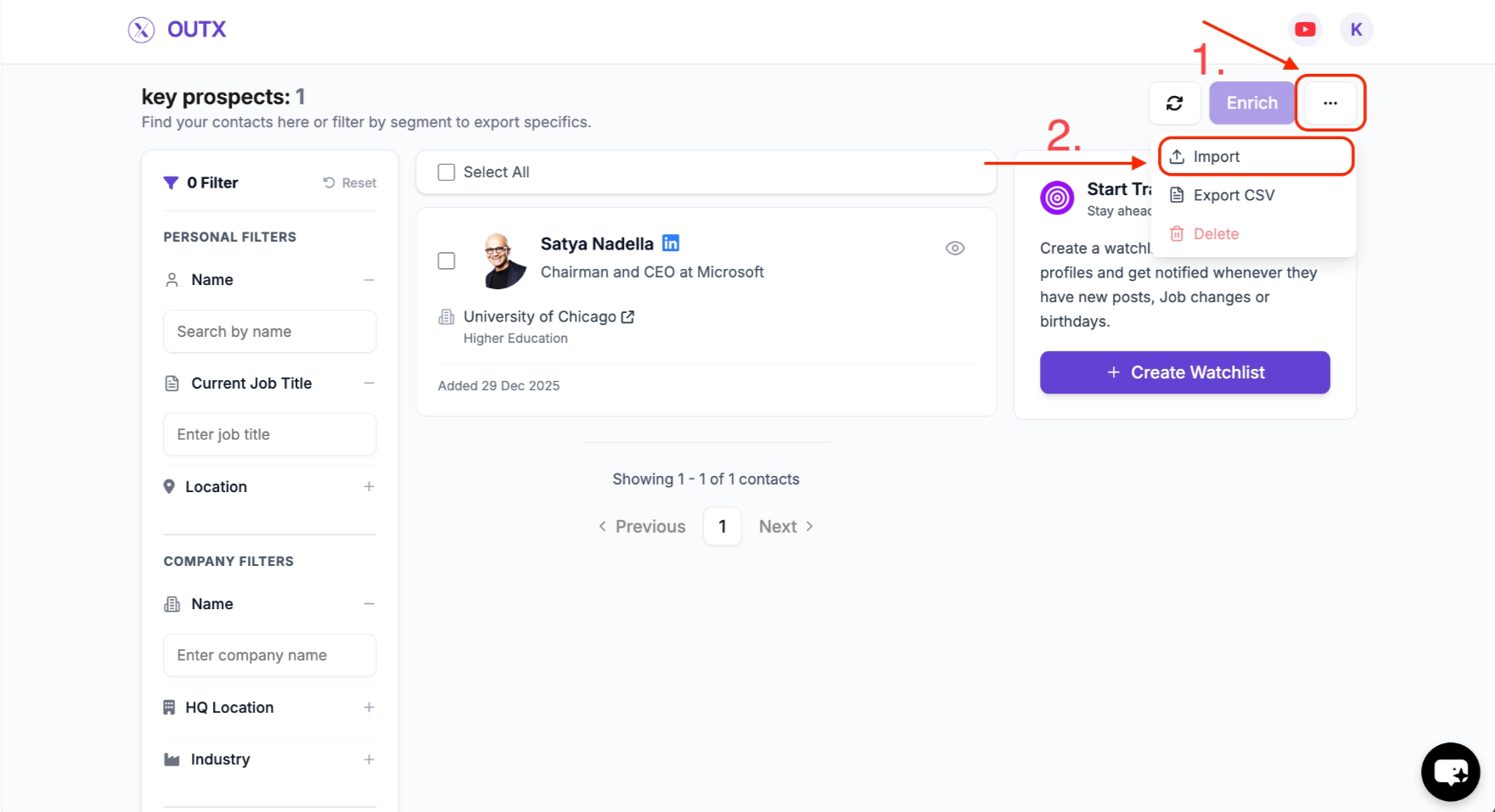
### 3. Import Profiles
Within the list, click the **three dots (⋯)** in the **top right corner**, and then select **Import**.
***
### 4. Add or Update Profiles
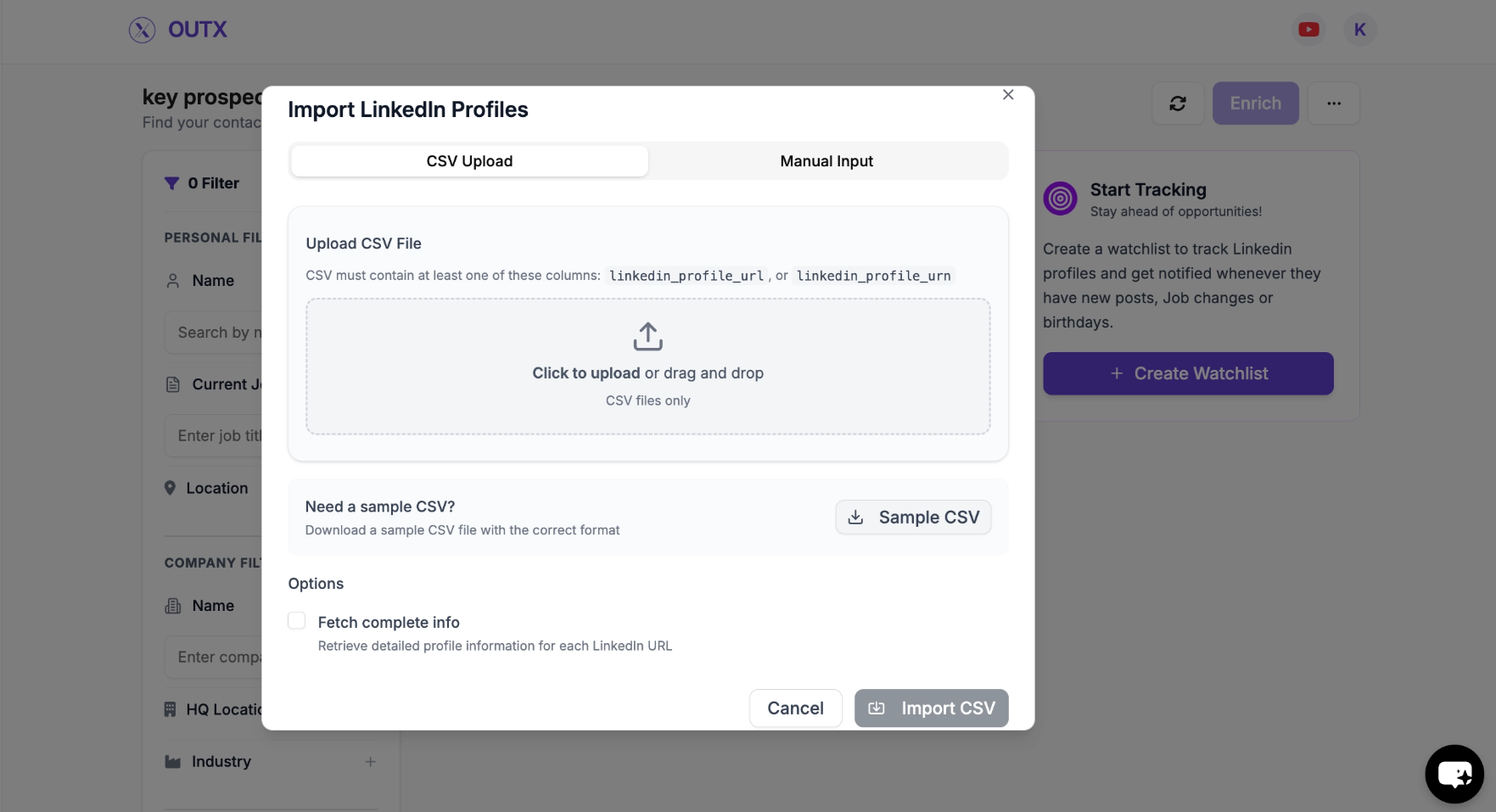
You can now update the list of people to be tracked in two ways:
* **Manual Import** – Paste LinkedIn profile URLs or enter them one-by-one.
* **CSV Import** – Upload a CSV file containing LinkedIn profile URLs.
Make any additions or removals needed.
***
## Frequently Asked Questions
No, OutX only tracks publicly available data to stay compliant with LinkedIn's rules.
No, LinkedIn does not allow third-party tools to access private connection data.
If a user blocks you on LinkedIn, OutX cannot fetch their posts anymore.
Each watchlist supports up to 200 profiles. Your total depends on how many watchlists your plan includes: Growth allows 5 watchlists (1,000 profiles total), Expert allows 20 (4,000 total), and Ultimate allows 100 (20,000 total).
Yes, OutX supports this in the profile tracking module.
Yes, you can filter posts based on location if the post mentions the country you are targeting.
Removing a profile will stop tracking that person going forward. Previously collected activity for that profile may be retained depending on your plan and retention settings.
Yes. You can import multiple LinkedIn profiles at once using a **CSV** file via the import option. This is useful when updating large lists.
The core setup steps are the same as creating a watchlist. The only extra actions are:
1. Clicking the **edit (pencil) icon** to open the existing watchlist.
2. Navigating to the associated list and using the **import** option to update profiles.
Yes. You can update a People Watchlist as often as needed. Changes apply once you save the updated list.
Yes. OutX can track public LinkedIn posts from any profile, regardless of whether you are connected to them. However, some profiles with strict privacy settings may have limited visibility.
The fetch frequency depends on your watchlist settings and plan. Growth plans refresh every 24 hours, Expert plans every 12 hours, and Ultimate plans can refresh as frequently as every 6 hours.
You can track up to 500-1,500+ profiles in a single people watchlist, depending on your plan. Use the CSV import feature for adding large batches of profiles at once.
Yes. OutX detects job changes for tracked profiles. When a tracked person updates their LinkedIn title or moves to a new company, this shows up in your feed as a signal you can act on.
***
## Learn More
* [People Tracking Guide](https://www.outx.ai/blog/people-tracking-guide)
* [LinkedIn Prospecting Guide](https://www.outx.ai/blog/linkedin-prospecting-2025-guide)
* [LinkedIn Monitoring Guide](https://www.outx.ai/blog/linkedin-monitoring-guide-2025)
 ***
### **2. Add Profiles**
This step defines **which LinkedIn profiles OutX.ai should monitor**.
Examples:
* *Key Prospects*
* *Target Founders*
* *Hiring Managers – US*
This helps when you manage multiple people watchlists.
***
### **2. Add Profiles**
This step defines **which LinkedIn profiles OutX.ai should monitor**.
Examples:
* *Key Prospects*
* *Target Founders*
* *Hiring Managers – US*
This helps when you manage multiple people watchlists.
 This will create your people watchlist
***
### **3. Set Intents**
Intents help you **group people's post inside a watchlist**.
Instead of tracking everyone the same way, labels let you:
* Segment posts by role, intent, or priority
* Filter updates more easily
* Understand *why* someone is being tracked
**Intent Name**
A short category name such as:
* *Startup Mentors*
* *High-Intent Leads*
* *Decision Makers*
**Intent Description**
Add a short note explaining who belongs in this label.
This makes it easier for you and your team to stay aligned.
This will create your people watchlist
***
### **3. Set Intents**
Intents help you **group people's post inside a watchlist**.
Instead of tracking everyone the same way, labels let you:
* Segment posts by role, intent, or priority
* Filter updates more easily
* Understand *why* someone is being tracked
**Intent Name**
A short category name such as:
* *Startup Mentors*
* *High-Intent Leads*
* *Decision Makers*
**Intent Description**
Add a short note explaining who belongs in this label.
This makes it easier for you and your team to stay aligned.
 ***
### **4. Advanced Watchlist Settings & Notifications**
Fine-tune how and when you're notified:
* **Fetch frequency**: How often OutX.ai scans LinkedIn (e.g., every 12 hours)
* **Team access**: Add teammates to the watchlist
* **Slack integration**: Drop in your webhook URL to receive real-time alerts
***
### **4. Advanced Watchlist Settings & Notifications**
Fine-tune how and when you're notified:
* **Fetch frequency**: How often OutX.ai scans LinkedIn (e.g., every 12 hours)
* **Team access**: Add teammates to the watchlist
* **Slack integration**: Drop in your webhook URL to receive real-time alerts
 ### Feed
OutX.ai now tracks all selected LinkedIn profiles automatically, delivering relevant updates without manual checking.
### Feed
OutX.ai now tracks all selected LinkedIn profiles automatically, delivering relevant updates without manual checking.
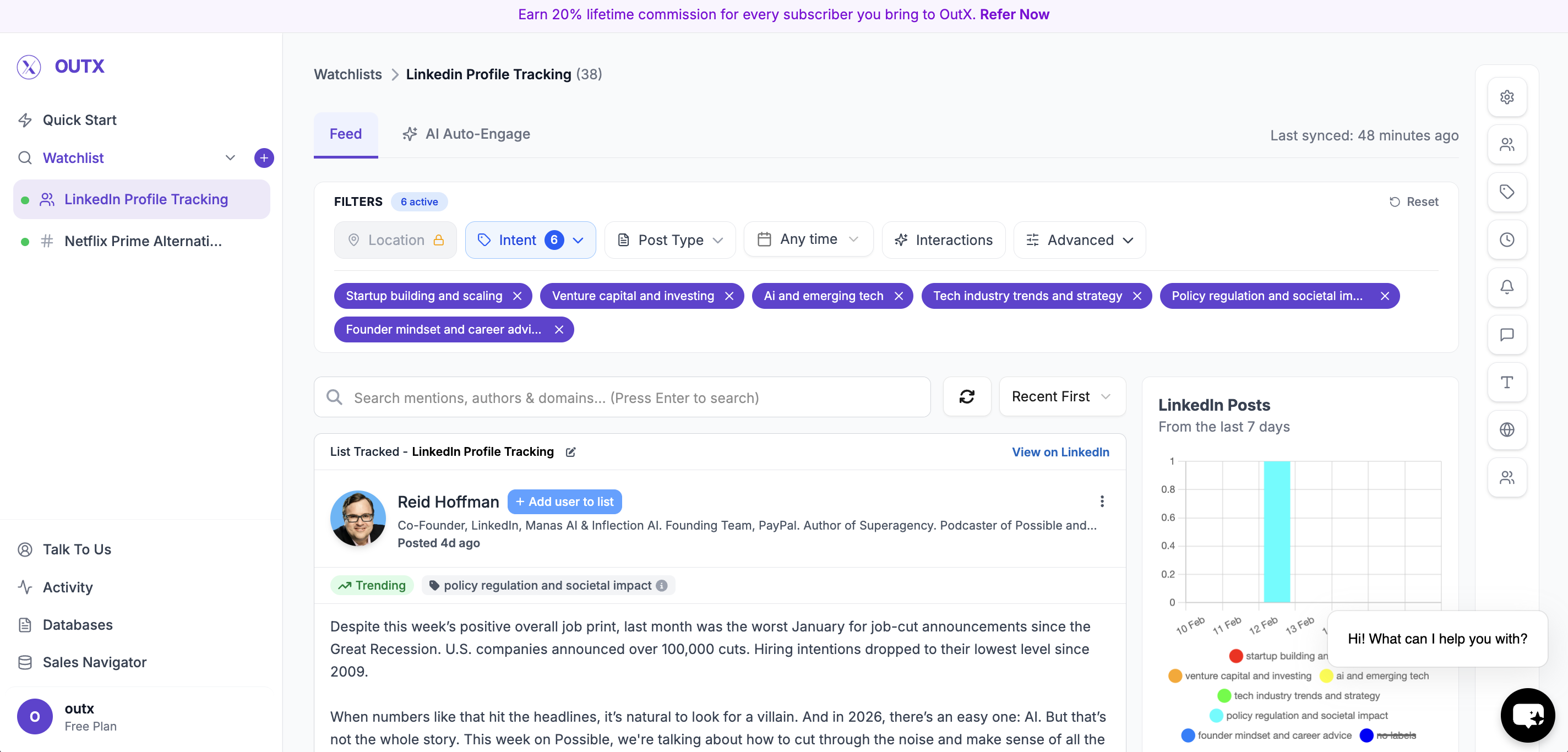 You can use filters to figure on left side to narrow down on your posts, to learn more about filters click here.
***
## How to edit people watchlist?
### 1. Open Watchlist
Navigate to **Watchlist you want to update** from the main dashboard. Click the **configuration(Gear icon)** on right side panel.
You can use filters to figure on left side to narrow down on your posts, to learn more about filters click here.
***
## How to edit people watchlist?
### 1. Open Watchlist
Navigate to **Watchlist you want to update** from the main dashboard. Click the **configuration(Gear icon)** on right side panel.
 ### 2. Edit in database
Click on edit in database then add people in selected list.
### 2. Edit in database
Click on edit in database then add people in selected list.
 ***
### 3. Import Profiles
Within the list, click the **three dots (⋯)** in the **top right corner**, and then select **Import**.
***
### 3. Import Profiles
Within the list, click the **three dots (⋯)** in the **top right corner**, and then select **Import**.
 ***
### 4. Add or Update Profiles
You can now update the list of people to be tracked in two ways:
* **Manual Import** – Paste LinkedIn profile URLs or enter them one-by-one.
* **CSV Import** – Upload a CSV file containing LinkedIn profile URLs.
***
### 4. Add or Update Profiles
You can now update the list of people to be tracked in two ways:
* **Manual Import** – Paste LinkedIn profile URLs or enter them one-by-one.
* **CSV Import** – Upload a CSV file containing LinkedIn profile URLs.
 Make any additions or removals needed.
***
## Frequently Asked Questions
Make any additions or removals needed.
***
## Frequently Asked Questions