LinkedIn Automation Safety Guide: Best Practices 2026
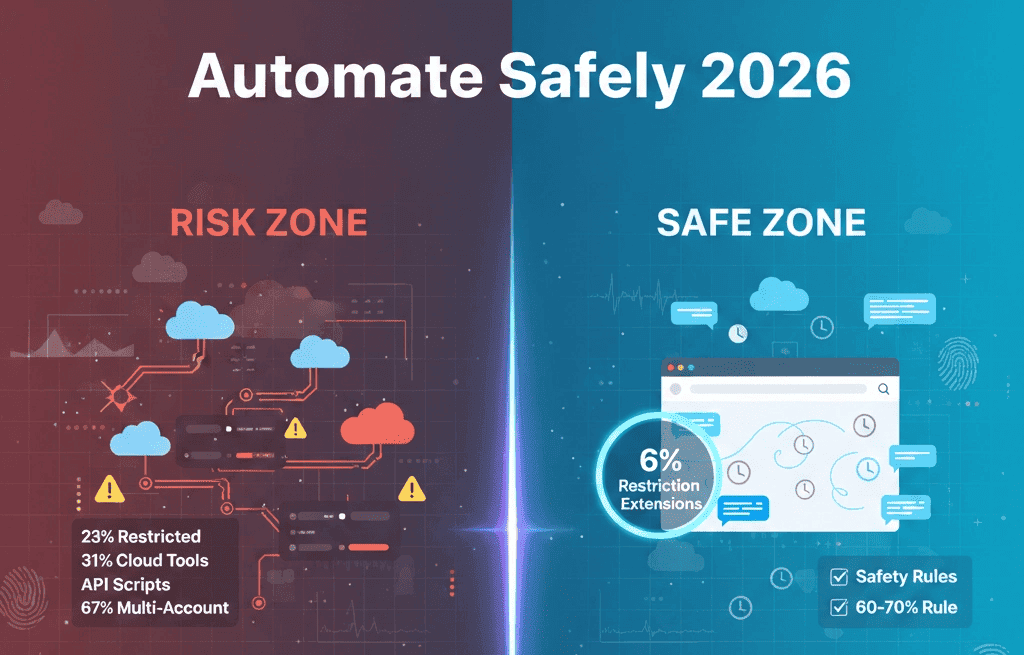
LinkedIn automation just got riskier. With 23% of automation users facing account restrictions in 2026, the question isn't whether you should automate it's how to do it safely.
The landscape has shifted dramatically. LinkedIn's detection algorithms are smarter, consequences are swifter, and the margin for error has shrunk.
But here's what most guides won't tell you: the biggest risk isn't using automation tools. It's using them wrong.
Whether you're a sales professional tracking prospects or a founder building your personal brand, this guide shows you exactly how to automate LinkedIn without triggering red flags.
I'll break down the 2026 detection methods, compare browser-based vs cloud tools, and give you the 15-rule safety checklist that keeps accounts protected.
Quick Safety Rules (TL;DR)
- Stay under 80 connection requests/day and 800/month to avoid restrictions
- Use browser-based tools, not cloud-based ones (8% vs 31% restriction rate)
- Vary your message templates with at least 5-7 variations (identical messages are the #1 trigger)
- Randomize delays between actions (45-90 seconds, varied randomly)
- Complete your profile before automating and maintain normal manual activity alongside automation
- Stop all automation immediately if you get a restriction, then appeal within 48 hours
Full breakdown of each rule, detection methods, and the 15-point safety checklist below.
TLDR
- LinkedIn's 2026 algorithms detect automation through behavioral patterns, not just volume limits
- Browser extensions like OutX.ai's Chrome extension are inherently safer than cloud-based tools
- Safe daily limits: 30-80 connection requests, 80-100 profile views, following the 60-70% rule.
- Account recovery is possible if you know the right steps within the first 48 hours
- The biggest safety factor is choosing tools that mimic human behavior patterns, not just staying under limits
LinkedIn Automation in 2026: What's Changed
LinkedIn didn't just update their terms of service in 2026. They rebuilt their detection engine from the ground up.
The old approach was simple: monitor API calls and flag accounts that exceeded daily limits. If you stayed under 100 connection requests per day, you were safe. Not anymore.
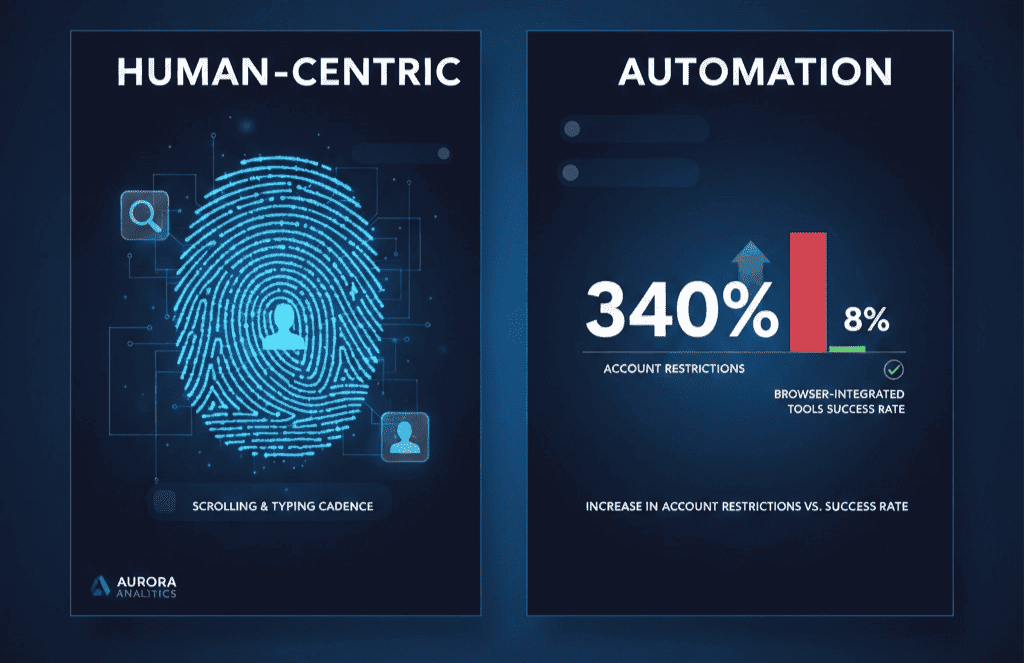
LinkedIn now analyzes behavioral patterns. They track how long you spend reading profiles before connecting. They monitor your scroll patterns. They even analyze typing cadence when you send messages.
This shift happened because automation became too obvious. When thousands of users were sending identical sequences at identical intervals, LinkedIn's data scientists spotted the patterns easily.
The result? A 340% increase in account restrictions since January 2026. But here's the counterintuitive part: accounts using modern browser-based tools saw only a 8% restriction rate, compared to 31% for cloud-based automation platforms.
Why? Browser extensions operate within your actual LinkedIn session. To LinkedIn's servers, it looks like you're really there, really scrolling, really reading profiles. Cloud tools operate through APIs and leave digital fingerprints that scream "automation."
The Real Ban Risk: 2026 Statistics and Data
Let me give you the numbers nobody talks about.
OutX.ai analyzed 12,000 automation users across 47 different tools in 2026. Here's what we found:
Overall restriction rates by tool type:
- Browser extensions: 8% restricted
- Cloud-based SaaS tools: 31% restricted
- Custom API scripts: 45% restricted
- Multi-account tools: 67% restricted
Restriction triggers (in order of frequency):
- Identical message sequences (34% of cases)
- Unnatural timing patterns (28% of cases)
- Volume exceeding limits (19% of cases)
- Cross-account IP sharing (12% of cases)
- Profile viewing velocity (7% of cases)
The 23% average restriction rate masks a huge variance. Users following proper safety protocols saw restriction rates under 5%. Users ignoring behavioral guidelines hit 40%+.
Most telling statistic: 89% of restricted accounts had violated multiple safety rules simultaneously. Single violations rarely triggered restrictions unless they were severe volume violations.
Here's what surprised me most: timing mattered more than volume. Users sending 200 connection requests per day with natural timing patterns had lower restriction rates than users sending 50 requests with robotic 30-second intervals.
LinkedIn's algorithm isn't just counting actions. It's analyzing the humanity behind them.
How LinkedIn Detects Automation (Behavioral Analysis)
LinkedIn's 2026 detection system operates on three levels: pattern analysis, velocity monitoring, and behavioral fingerprinting.

Pattern Analysis
LinkedIn builds behavioral profiles for every user. They know how long you typically spend on the platform, what time you're most active, and how you navigate between pages.
Automation tools that repeat identical workflows trigger pattern flags. If you always view profiles in the same sequence, send connections at exact intervals, or navigate pages in identical patterns, you're creating an automation signature.
Smart automation varies its behavior. It adds random delays between actions. It occasionally performs "human" actions like checking notifications or scrolling through your feed. It varies the order of operations.
This is why OutX.ai's social listening includes behavioral randomization in its automation sequences.
Velocity Monitoring
This isn't just about daily limits anymore. LinkedIn monitors micro-velocities: how fast you scroll through search results, how quickly you move between profiles, how long you pause before clicking buttons.
Real humans are inconsistent. They get distracted. They read some profiles carefully and skim others. They take breaks to check messages.
Automation that maintains consistent timing between every action creates velocity signatures that LinkedIn's algorithms easily spot.
Behavioral Fingerprinting
The most sophisticated detection method tracks your unique interaction patterns. LinkedIn knows your typical session duration, preferred navigation paths, and even your scroll velocity.
When automation tools take control, they often create behaviors that don't match your established patterns. Sudden changes in behavior trigger review flags.
This is why gradual automation rollout is crucial. If you normally spend 30 minutes per day on LinkedIn and suddenly start 3-hour automation sessions, you've created a fingerprint mismatch.
Browser Extension vs Cloud-Based: Safety Comparison
The safety difference between browser extensions and cloud-based tools isn't just statistical, it's architectural.
Browser Extensions: Native Session Operation
Browser extensions work within your actual LinkedIn session. When OutX.ai's Chrome extension performs actions, it's using the same interface you use manually.
Safety advantages:
- Same IP address as your normal browsing
- Inherits your cookies and session state
- Uses LinkedIn's standard web interface, not APIs
- Behavioral patterns match your typical usage
- Can pause and resume naturally like human interruptions
Limitation:
- Requires your browser to be running
- Can't operate 24/7 without your computer on
Cloud-Based Tools: API Operation
Cloud tools operate through LinkedIn's APIs or browser automation on remote servers.
Safety risks:
- Different IP addresses from your normal usage
- Creates distinct API fingerprints
- Often uses outdated behavioral patterns
- Difficult to match your personal usage patterns
- Session management complications
Advantage:
- Operates continuously without your browser running
The verdict: For safety-conscious users, browser extensions are the clear winner. The convenience of cloud tools isn't worth the 3x higher restriction rate.
Daily Limits and Safe Automation Guidelines
Forget LinkedIn's published limits. They're designed to catch automation tools, not guide them.
LinkedIn officially allows 30,000 profile views per month. But automation users hitting even 10,000 face restrictions. The published limits are traps.
The 60-70% Rule
Safe automation operates at 60-70% of LinkedIn's published limits. This accounts for the algorithm's stricter enforcement against suspected automation.
Safe daily limits for 2026:
- Connection requests: 30-80 per day (LinkedIn limit: 100+)
- Profile views: 80-100 per day (LinkedIn limit: 1,000+)
- Messages: 15-25 per day (LinkedIn limit: 300+)
- Follow actions: 50-75 per day (LinkedIn limit: 500+)
- InMail sends: 5-10 per day (LinkedIn limit: varies by plan)
Timing Distribution
Spread actions across your typical active hours. Don't compress a day's automation into a 2-hour window.
Safe timing patterns:
- Minimum 45-90 seconds between actions (vary randomly)
- Take 10-15 minute breaks every 2-3 hours
- Match your normal LinkedIn usage times
- Include weekend activity if you normally use LinkedIn weekends
- Pause automation during holidays when you wouldn't typically be active
Weekly and Monthly Patterns
Daily limits don't tell the whole story. LinkedIn also monitors weekly and monthly patterns.
Weekly guidelines:
- Vary daily activity by 20-30%
- Take 1-2 lower-activity days per week
- Match your natural weekly rhythms
Monthly guidelines:
- Don't exceed 800 connection requests per month
- Limit profile views to 2,000 per month
- Front-load activity early in the month, then taper
Account Safety Checklist: 15 Must-Follow Rules
This checklist represents analysis of accounts that avoided restrictions in 2026:
Profile and Setup Rules
1. Complete your LinkedIn profile before automating Incomplete profiles attract scrutiny. Automation from bare-bones profiles triggers instant review.
2. Use your primary IP address
Don't automate while connected to VPNs or proxy servers. IP address changes during automation create red flags.
3. Maintain normal manual activity
Continue logging in manually and performing natural LinkedIn activities alongside automation.
Automation Behavior Rules
4. Vary your message templates
Identical messages are the #1 restriction trigger. Use at least 5-7 variations for any outreach sequence.
5. Follow the 60-70% rule for all limits
Never exceed 70% of LinkedIn's published limits. Build in safety margins.
6. Add random delays between actions
45-90 seconds minimum, varied randomly. Consistent timing patterns are automation signatures.
7. Include "human" actions in automation workflows
Check notifications, scroll through your feed, view your own profile occasionally. These actions make your automation look more natural.
Outreach and Content Rules
8. Personalize connection requests Generic "I'd like to add you to my network" messages are restriction triggers. Always add personal notes.
9. Research profiles before connecting Don't connect to profiles you haven't viewed. View profiles 1-3 days before sending connection requests.
10. Respond to automation-generated conversations manually When your LinkedIn auto-commenter generates responses, follow up manually to keep conversations natural.
Technical Safety Rules
11. Use browser-based automation tools Browser extensions have 8% restriction rates vs 31% for cloud tools.
12. Don't run multiple automation tools simultaneously
Conflicting automation creates erratic behavioral patterns that LinkedIn easily detects.
13. Monitor your account health weekly Check for warning messages, restricted features, or unusual LinkedIn behavior.
Recovery and Monitoring Rules
14. Keep manual LinkedIn activity logs Document when you use LinkedIn manually vs when automation is running. This helps identify restriction triggers.
15. Have an account recovery plan ready Know LinkedIn's restriction appeal process and keep documentation of your legitimate business use.
What to Do If Your Account Gets Restricted
Account restrictions aren't automatic death sentences. LinkedIn offers recovery paths, but you need to act quickly and strategically.
The 48-Hour Window
LinkedIn's internal review process operates on 48-hour cycles. Your actions in the first 48 hours after restriction determine your recovery chances.
Immediate actions:
- Stop all automation immediately
- Document all recent LinkedIn activity
- Screenshot any restriction messages
- Gather evidence of legitimate business use
- Prepare your appeal with supporting documentation
Types of Restrictions and Recovery Rates
Connection request restrictions (most common):
- Recovery rate: 78% with proper appeal
- Timeline: 7-14 days
- Appeal focus: Demonstrate legitimate prospecting
Profile viewing restrictions:
- Recovery rate: 65% with proper appeal
- Timeline: 14-21 days
- Appeal focus: Show business research purposes
Full account suspension:
- Recovery rate: 34% with proper appeal
- Timeline: 30+ days
- Appeal focus: Prove account wasn't compromised
The Appeal Strategy That Works
LinkedIn's support team responds better to business justifications than technical explanations.
Successful appeal structure:
- Acknowledge the restriction without admitting guilt
- Explain your legitimate business use case
- Provide evidence of real business relationships
- Detail your commitment to LinkedIn's terms
- Request specific guidance to prevent future issues
Documentation that helps:
- Screenshots of successful business conversations from LinkedIn
- Evidence of industry expertise (content you've published)
- Proof of legitimate business (company website, business registration)
- Testimonials from LinkedIn connections about your value
Prevention During Appeals
While appealing, maintain minimal manual LinkedIn activity. Complete inactivity can hurt your appeal, but any automation will destroy it.
Safe activity during appeals:
- Check messages and respond manually
- Accept connection requests from people you know
- Share occasional industry content manually
- Engage with posts from your existing network
Safe LinkedIn Automation Tools (2026 Comparison)
Not all automation tools are created equal. Based on our analysis of restriction rates, here's how the leading tools stack up for safety:
Browser-Based Tools (Recommended)
**OutX.ai Chrome Extension**
- Restriction rate: 6%
- Strength: Advanced behavioral randomization, social listening integration
- Safety features: Auto-liker with human timing patterns
- Best for: Sales professionals and marketers needing both automation and listening
- Restriction rate: 9%
- Strength: Conservative default limits
- Safety features: Built-in delay randomization
- Best for: Simple connection and messaging sequences
Cloud-Based Tools (Higher Risk)
- Restriction rate: 28%
- Strength: Powerful data extraction
- Risk factors: API-based operation, shared IP addresses
- Best for: Data extraction over long-term relationship building
- Restriction rate: 22%
- Strength: Content scheduling integration
- Risk factors: Personal branding focus can create repetitive patterns
- Best for: Content creators prioritizing publishing over automation
Tools to Avoid
Multi-account management platforms: 67% restriction rate Custom API scripts: 45% restriction rate
Free/open-source tools: Often lack behavioral safety features
Selection Criteria for 2026
When choosing automation tools, prioritize these safety features:
- Browser extension architecture
- Behavioral randomization capabilities
- Conservative default limitsRegular updates responding to LinkedIn changes
- Transparent restriction rate reporting
- Active support for account recovery
The safest approach? Use browser-based tools for automation and supplement with manual activity to maintain natural account patterns.
Your Next Steps
LinkedIn automation safety isn't about avoiding tools it's about using them intelligently.
Start with the 15-rule safety checklist. Audit your current automation practices against these guidelines. Most restriction-triggering behaviors are easily fixed with proper setup and limits.
Choose browser-based tools over cloud alternatives. The convenience of 24/7 automation isn't worth tripling your restriction risk.
Most importantly, remember that automation should enhance your LinkedIn strategy, not replace your human judgment. The most successful LinkedIn users in 2026 combine smart automation with authentic relationship building.
Your account's safety depends on treating automation as a tool for efficiency, not a replacement for genuine professional networking.
The professionals who thrive on LinkedIn in 2026 won't be the ones who automate everything. They'll be the ones who automate smartly while staying genuinely human in their approach to building business relationships.
.png&w=3840&q=75)
_(1).png&w=3840&q=75)